
Fixing an import
What it is for
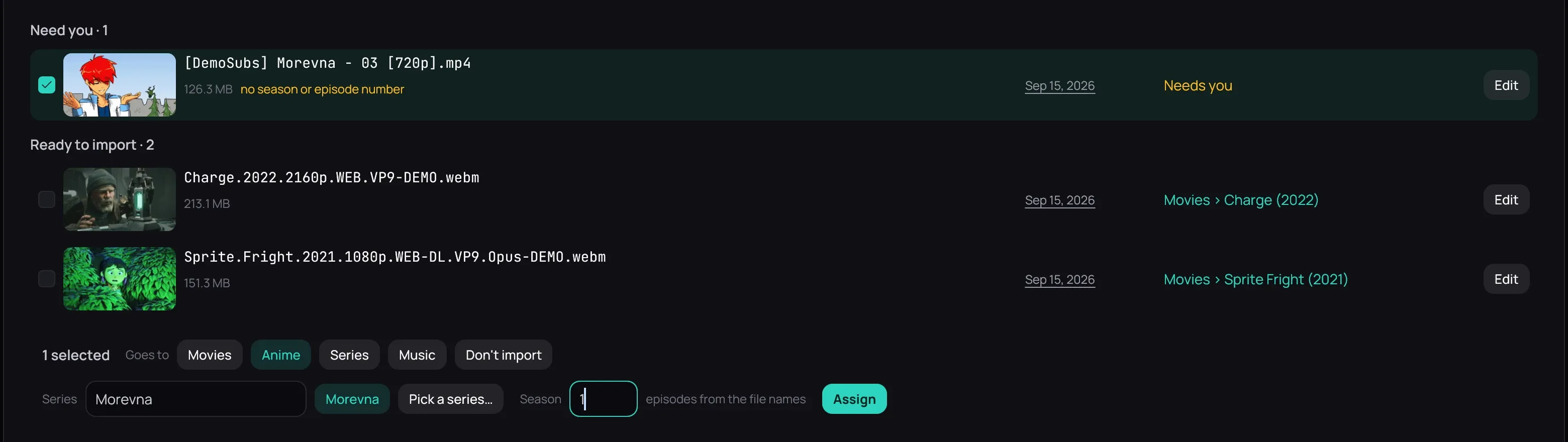
Section titled “What it is for”Kaveo does not guess. A file it cannot name waits under Need you in the import window, and nothing moves until you say where it belongs.
How to use it
Section titled “How to use it”- Tick the files that belong together: Shift+click ticks a run, and a row’s date ticks every file from that day.
- Under Goes to, click one of your categories — or Don’t import.
- Answer what it asks: a folder for your own videos (New folder suggests a name from the dates), or the series and the Season for episodes.
- Click Assign. The rows move to Ready to import and say where they will be filed.
Good to know
Section titled “Good to know”- Edit opens every detail of one file, such as a film’s title and year; Edit… in the bar edits the ticked files together, a value written once applying to them all.
- Search beside a title looks it up online; Use this match fills it in.
- Don’t import leaves files in the download folder; Don’t ask again stops Kaveo mentioning them at the next launch.
- A folder you name here is created only when you import.
- {MediaInfo …} tokens are read from the file: check that FFprobe is installed.
- Samples and bonus material are never imported, and a file still downloading is left out.