
Following the translation queue
What it is for
Section titled “What it is for”Watch and steer the subtitles waiting to be translated, after you have queued them — see Translating a whole series.
How to use it
Section titled “How to use it”The top bar shows the queue’s progress, for example Translating 3/9 · 42%. Click it to open the queue.
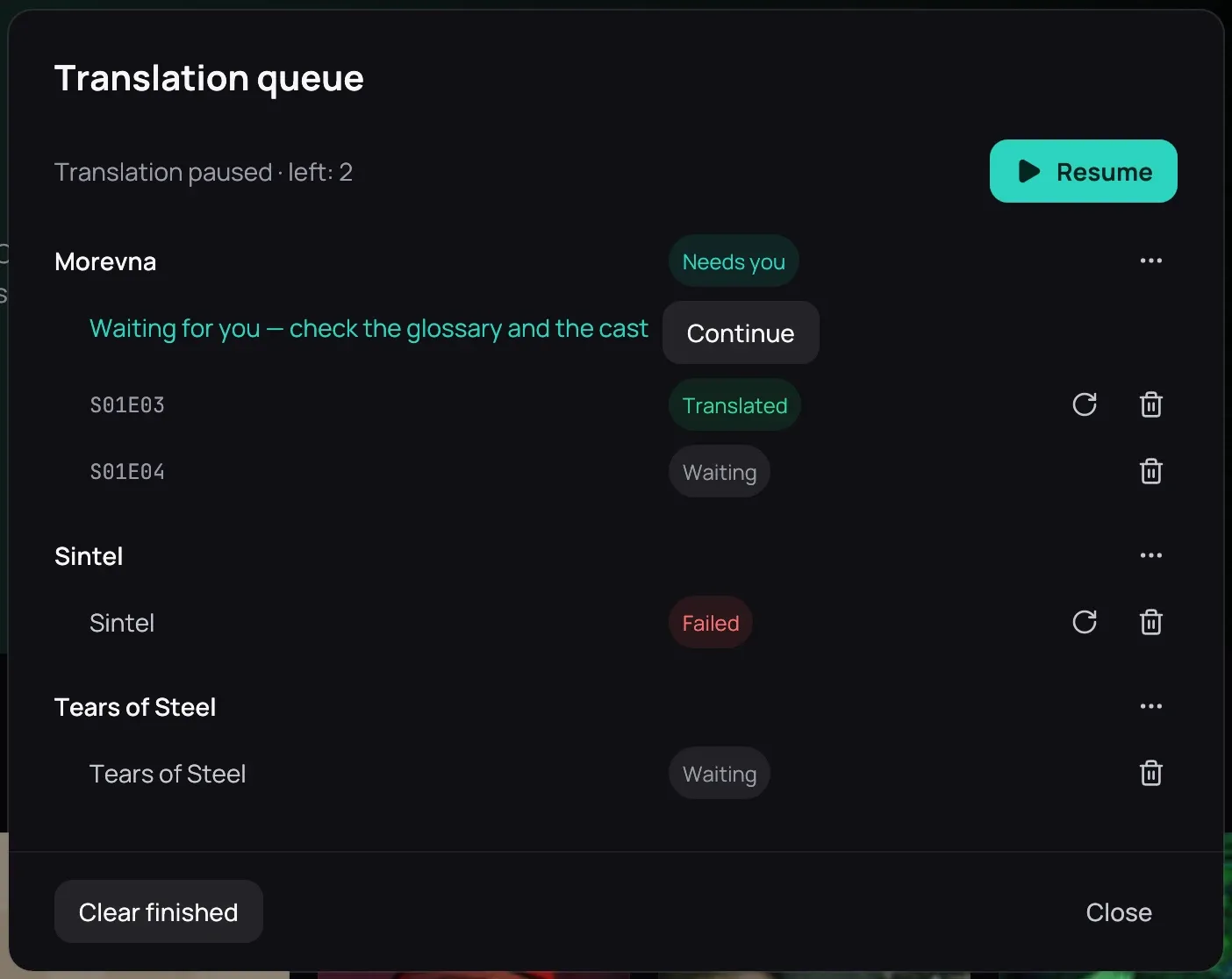
- Pause stops after the request in progress; Resume goes on from there. Both sit at the top, beside the queue’s status.
- A series’ ⋯ holds Move to the front, Move up, Move down and Remove this series from the queue; episodes keep their order.
- The cross cancels the episode in progress; the bin removes an episode.
- The round arrow translates an episode again, or retries one that failed.
Good to know
Section titled “Good to know”- The top bar shows nothing when the queue is empty, or when everything in it went well.
- The top bar is not shown in the player: go back to the library to see it.
- A running queue continues when Kaveo starts again.
- An episode marked in red needs you: hover over it to see why and what to do.
- A line under a finished episode names a style whose font is missing, or cannot draw some letters of your language. Press Use another font for this style… to pick an installed font that draws them all. Nothing changes until you do.
- A grey line under a finished episode counts the lines added from the audio. Press Review them… to see only those, and delete any that is not dialogue.