
Better translations
What it is for
Section titled “What it is for”Tell Kaveo, before it translates, how to spell names, who is speaking and how the result should sound.
How to use it
Section titled “How to use it”- With the subtitle you translate from on screen — not an earlier translation — press E and click All lines….
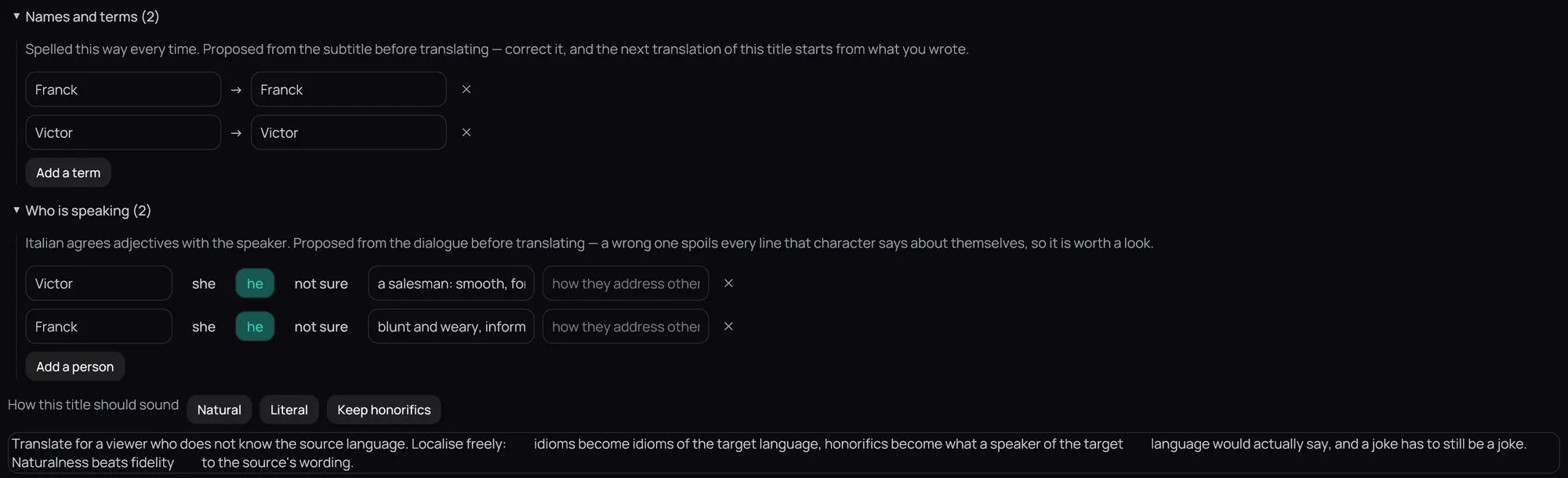
- Open Names and terms, click Add a term, and write each name as it appears and how to write it.
- Open Who is speaking, click Add a person, type the name and pick she, he or not sure.
- Under How this title should sound, click Natural, Literal or Keep honorifics.
- Click Back to keep them, then translate.
Good to know
Section titled “Good to know”- Kaveo proposes names, terms and speakers you did not describe, even when the subtitle names nobody; subtitles in other languages inside the video help it tell a man from a woman.
- The next episodes in the same folder reuse your names, speakers and style, add the ones each episode introduces without changing yours, and reuse a line you corrected wherever it returns. New lines can still need fixing.
- Lines that do not fit can be fixed on the translation’s All lines… page: Break the row and Give time change no word.