
The music queue
What it is for
Section titled “What it is for”Line up tracks from several albums, and see, reorder or trim what is still to come.
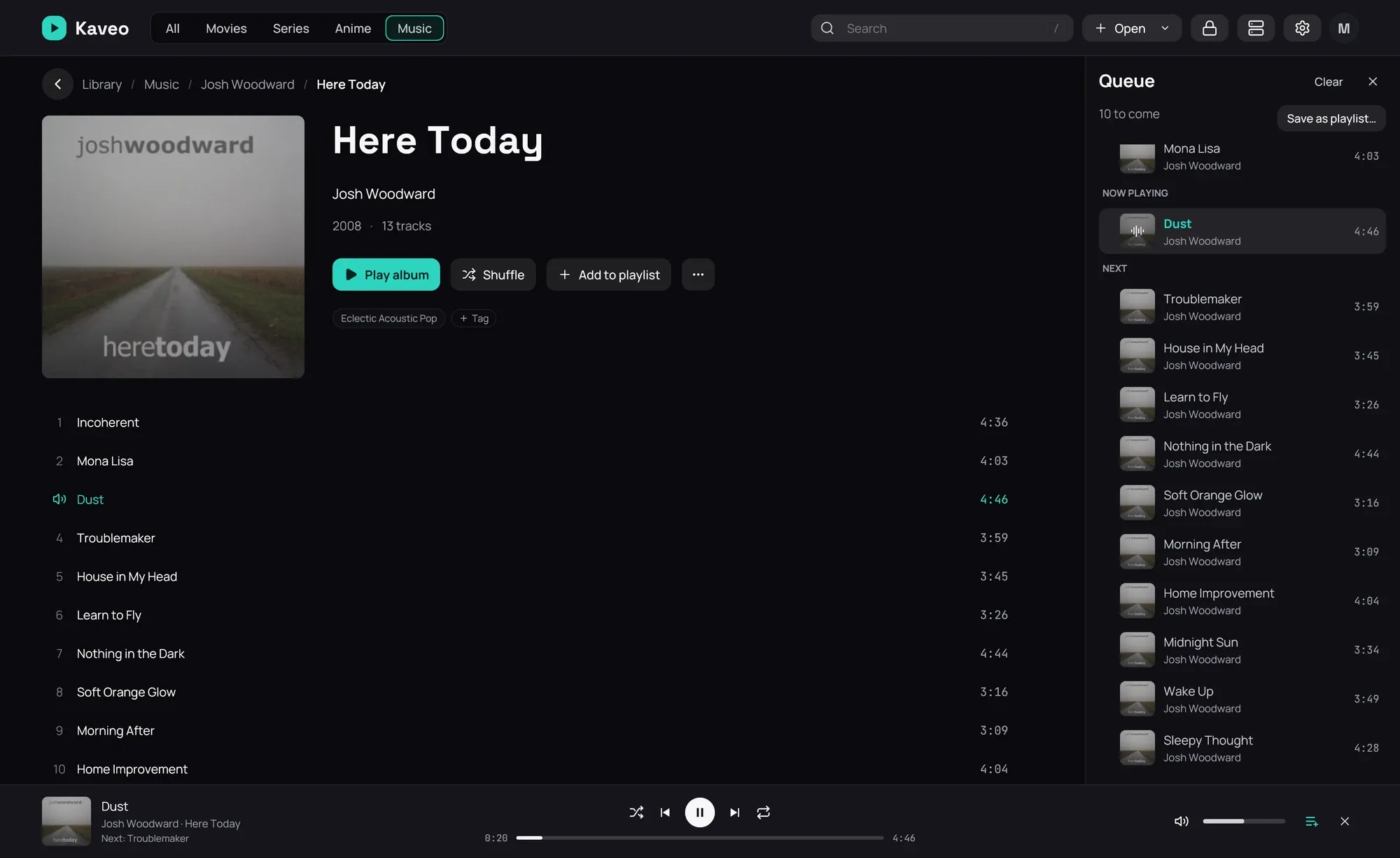
How to use it
Section titled “How to use it”- On an album page, click the three dots beside a track, or right-click the track.
- Choose Play next to hear it after the current track, or Add to queue to put it at the end.
- Open the queue with the list button on the playback bar or on the bar at the bottom of the window.
- Click a track to play it, or drag it up or down Next to move it. Rest the pointer on one for its buttons: play, move up, move down, take out. Clear empties what is still to come — it asks first, since nothing brings the list back.
Good to know
Section titled “Good to know”- The queue opens on Now playing; what has already played is above it.
- Queuing a track while an album plays keeps the rest of the album: the queue starts from it.
- A track already in the queue is not added twice; Play next moves it instead.
- If you close Kaveo while music plays, the queue is still there next time.
- In the last seconds of a track the next one is already on its way. Taking it out or moving it then is too late: it plays, and the rest of the queue follows it.