
Vault
What it is for
Section titled “What it is for”Settings › Vault holds the vault’s own preferences. It does not create one — the padlock in the top bar does — and an existing vault cannot be moved from here.
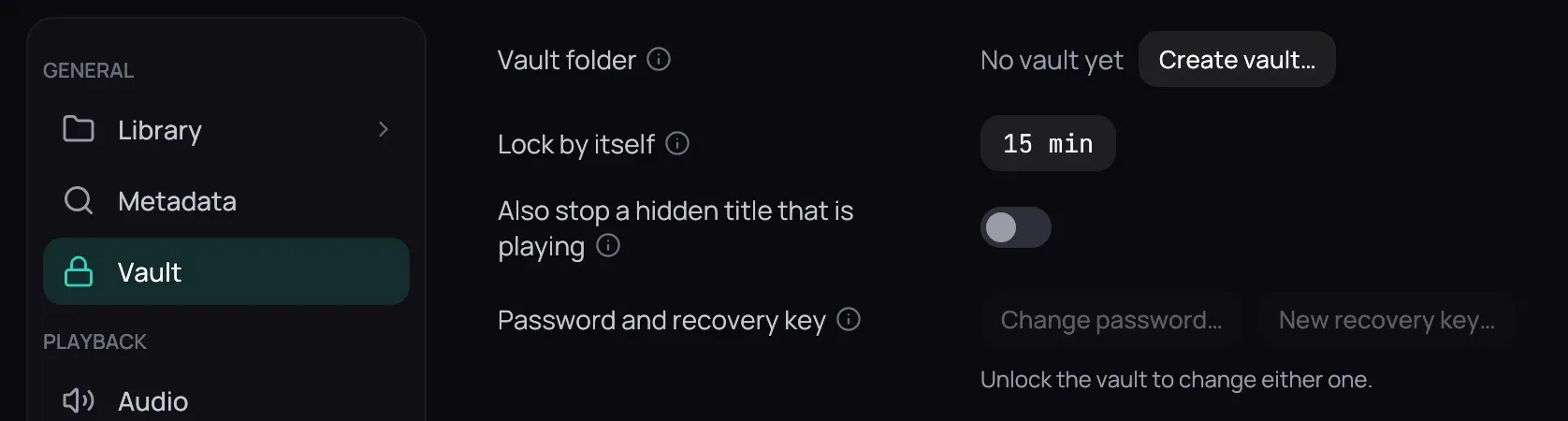
How to use it
Section titled “How to use it”- Vault folder shows where the encrypted files are, read-only; it reads No vault yet, with Create vault… beside it, until you set one up.
- Set Lock by itself to how many minutes the vault waits before locking itself: 15 to begin with, and 0 means never.
- Turn on Also stop a hidden title that is playing to have that lock stop the film too; it starts off, since a film already on screen is not a further leak.
- Click Save — both of those wait for it, like every other value; see Saving changes.
Good to know
Section titled “Good to know”- Under Password and recovery key, Change password… and New recovery key… need the vault unlocked, and say so. Either change is kept as soon as its dialog says it is done: no Save, and nothing for Revert to put back. See Locking and unlocking.
- Vault folder not reachable, in red, means the drive it lives on is not mounted.