
Loading subtitles
What it is for
Section titled “What it is for”Play a subtitle file beside the video, a track inside it, or a file on your Jellyfin server. A file you pick, or a track you extract, becomes your own copy to sync, edit or translate.
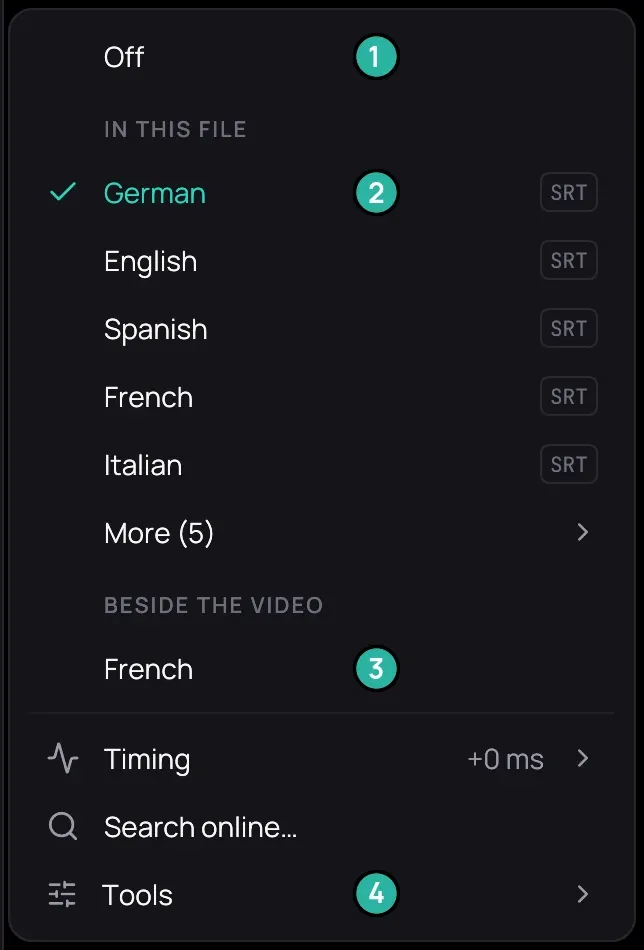
- Off.
- A track inside the video.
- A subtitle file beside it.
- Tools, where Extract from this file is.
How to use it
Section titled “How to use it”- While the video plays, right-click the picture, open Subtitles and pick a track under In this file (past five, under More) or a file under Beside the video.
- To add a file, save an SRT, ASS or WebVTT file beside the video with a name starting with the video’s own, such as Film (2016).ita.srt.
- To pull a track out, open Tools › Extract from this file and click it. Kaveo reads the whole video, then lists the result under Beside the video.
Good to know
Section titled “Good to know”- A picture-based track, as on most Blu-rays, cannot be extracted: its row is greyed.
- On a Jellyfin title, the server’s files are under Subtitle files on the server: click one to add it, or its bin to delete it from the server at once. Copied one there yourself? See New files on a server.
- A private title plays only the tracks inside its video.
- If a file shows broken accents (è instead of è), Subtitles › Tools offers Fix accented letters; Undo the accent fix puts it back.